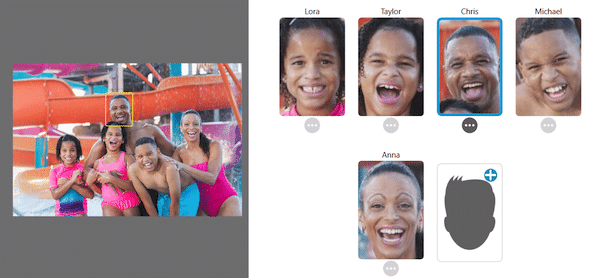

Key Features of Tag That Photo
Advanced Face Recognition
Effortless Tagging System
Smart Photo Searching
Why is metadata so
Understanding metadata today is primarily difficult because of the complex overlap of multiple standards, inconsistent handling by software applications, and the frequent use of proprietary data formats.
The Overlap of Multiple Standards There is significant overlap between the three major metadata standards used today: EXIF, IPTC, and XMP. Each was developed at a different time for a different purpose:
- EXIF is written automatically by cameras and devices to record technical capture data, such as GPS coordinates and exposure settings.
- IPTC was developed for newsrooms to hold editorial and human-written data, like captions, keywords, and copyright notices.
- XMP is an extensible standard developed by Adobe that can encompass both technical and descriptive information.
Because these standards overlap, the same logical piece of information often exists in multiple places under different names. For example, an image’s caption is called ImageDescription in EXIF, Caption-Abstract in IPTC, and dc:description in XMP.
Synchronization Failures Editing software is supposed to keep these overlapping fields in sync, but many applications fail to do so. As a result, you might update a timestamp or caption in one application that only writes to XMP, while an older application reads the outdated IPTC data. This leads to confusing discrepancies, such as out-of-sync timestamps or mismatched keywords, making it hard to know which data is the “source of truth”.
Proprietary and “Hidden” Metadata Another major challenge is that manufacturers and software developers frequently use proprietary formats to store data:
- MakerNotes: Camera vendors often bury important shooting data and unique device identifiers inside private EXIF sections called “MakerNotes”. Standard metadata viewers do not display this information, making it invisible to the average user.
- Application-Specific XMP: Some photo editing applications save user-entered descriptions or keywords into proprietary XMP containers rather than using the official XMP fields. While this data remains in the file, it becomes unreadable when opened in different software.
- Fragmented Face Tags: Features like face tagging suffer from similar fragmentation. Different programs use competing standards to record face regions—such as the Metadata Working Group (MWG) standard, Microsoft Photo Gallery (MP), or the IPTC Extension. A tag created in one program may be completely unreadable in another.
Data Loss and Platform Interference Finally, metadata is frequently lost or corrupted as images move across different platforms. Many photo editing applications inadvertently strip or corrupt EXIF data when saving or exporting an image. Furthermore, social media platforms and web services routinely remove embedded metadata when images are uploaded, resized, or downloaded. This breaks the link between the image and its descriptive data, meaning that carefully organized photos can lose all of their context the moment they are shared online.
Tag That Photo helps you synchronize and clean-up metadata while preserving with today’s standards.
Listen to our audio summary of the metadata quagmire below.